
- Marketing Nation
- :
- Products
- :
- Product Discussions
- :
- Re: Spaces in Filters
Your Achievements


Next /
Sign inSign in to Community to gain points, level up, and earn exciting badges like the new Applaud 5 BadgeLearn more!
View All BadgesSign in to view all badges
SOLVED
Re: Spaces in Filters
Go to solution
Topic Options
- Subscribe to RSS Feed
- Mark Topic as New
- Mark Topic as Read
- Float this Topic for Current User
- Bookmark
- Subscribe
- Printer Friendly Page


- Mark as New
- Bookmark
- Subscribe
- Mute
- Subscribe to RSS Feed
- Permalink
- Report Inappropriate Content
03-07-2016
04:49 PM
03-07-2016
04:49 PM
I'm creating a Smart List for scoring purposes and I want to include titles with IT. Examples: Director of IT, IT Manager, IT Security, etc. Since there are many title variations that will include "IT", I do not want to use an exact match. Is there a way to locate titles that include "IT" but also exclude words with "it" in them? Examples of words with "it" in them that we would want to exclude are architect, unit, critical, etc. There is a way to build a filter formula in SFDC that will include spaces - example: CONTAINS( LOWER( Title ) , " it") -- Notice the space before the " it". Is there a way to do something similar in Marketo?
Solved! Go to Solution.
Labels:
1 ACCEPTED SOLUTION
Accepted Solutions


- Mark as New
- Bookmark
- Subscribe
- Mute
- Subscribe to RSS Feed
- Permalink
- Report Inappropriate Content
01-25-2018
03:21 PM
01-25-2018
03:21 PM
Hi Tammy,
To add spaces around a filter value, adapt my approach from Creating a line break token for history fields
The changes from the history field method are:
- You're looking for the POST to /editSmartListSubmit, not /updateTokenData
- You're changing your placeholder value (three dashes) --- to %20 in the replay
The deal is otherwise the same: Marketo doesn't actually have a problem with special characters on the back end, it's that the front end filters them out unless you get creative.
Then you can get just what you want:
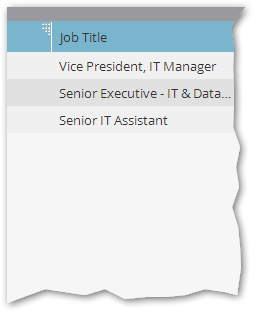
Instead of the overly broad [contains] results:
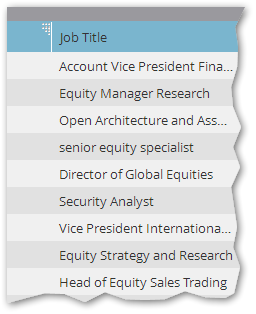
21 REPLIES 21


- Mark as New
- Bookmark
- Subscribe
- Mute
- Subscribe to RSS Feed
- Permalink
- Report Inappropriate Content
03-07-2016
06:03 PM
03-07-2016
06:03 PM
Re: Spaces in Filters
Spaces aren't recognized in most situations.
I wrote about this in my guide, but you need to make several smart lists:
- Job Title CONTAINS
- Job Title STARTS WITH
- Job Title IS
- Job Title IS NOT [list of bad values that could come up from "it" or "intern*"
(1 or 2 or 3) and 4
it might work better to have 2 or 3 and then cross them.
- Mark as New
- Bookmark
- Subscribe
- Mute
- Subscribe to RSS Feed
- Permalink
- Report Inappropriate Content
03-07-2016
07:45 PM
03-07-2016
07:45 PM
Re: Spaces in Filters
It is possible to create a filter that includes leading and trailing spaces, but you can't do it using the UI directly. Same reason you can't directly enter a line break in a flow textbox: the Marketo back end does fully support these characters, but the front end "helpfully" strips them out.
To store this filter on the back end, you can use the same hack I developed to create a line break token. You can contact me if you're interested.


- Mark as New
- Bookmark
- Subscribe
- Mute
- Subscribe to RSS Feed
- Permalink
- Report Inappropriate Content
01-25-2018
02:51 PM
01-25-2018
02:51 PM
Re: Spaces in Filters
Hi Sanford,
I'm running into the same issue here, would you be able to tell me how you addressed this? I basically want to bucket all "IT" contained titles into a segment but i'm getting things like "digital" etc.
Thanks!
- Mark as New
- Bookmark
- Subscribe
- Mute
- Subscribe to RSS Feed
- Permalink
- Report Inappropriate Content
01-25-2018
03:21 PM
01-25-2018
03:21 PM
Hi Tammy,
To add spaces around a filter value, adapt my approach from Creating a line break token for history fields
The changes from the history field method are:
- You're looking for the POST to /editSmartListSubmit, not /updateTokenData
- You're changing your placeholder value (three dashes) --- to %20 in the replay
The deal is otherwise the same: Marketo doesn't actually have a problem with special characters on the back end, it's that the front end filters them out unless you get creative.
Then you can get just what you want:
Instead of the overly broad [contains] results:
- Mark as New
- Bookmark
- Subscribe
- Mute
- Subscribe to RSS Feed
- Permalink
- Report Inappropriate Content
01-26-2018
12:02 PM
01-26-2018
12:02 PM
Re: Spaces in Filters
This is AWESOME! Thank you SO MUCH!
- Mark as New
- Bookmark
- Subscribe
- Mute
- Subscribe to RSS Feed
- Permalink
- Report Inappropriate Content
01-26-2018
03:30 PM
01-26-2018
03:30 PM
Re: Spaces in Filters
It is really useful, right?
I'm going to do a little updated blog post on it -- ran it on one of my instances and real " IT " had 10 leads (granted, not a technology company) while "IT" had 72 pages of leads! People may have no idea how off they are...
- Mark as New
- Bookmark
- Subscribe
- Mute
- Subscribe to RSS Feed
- Permalink
- Report Inappropriate Content
02-08-2018
10:12 AM
02-08-2018
10:12 AM
Re: Spaces in Filters
Hey Sanford
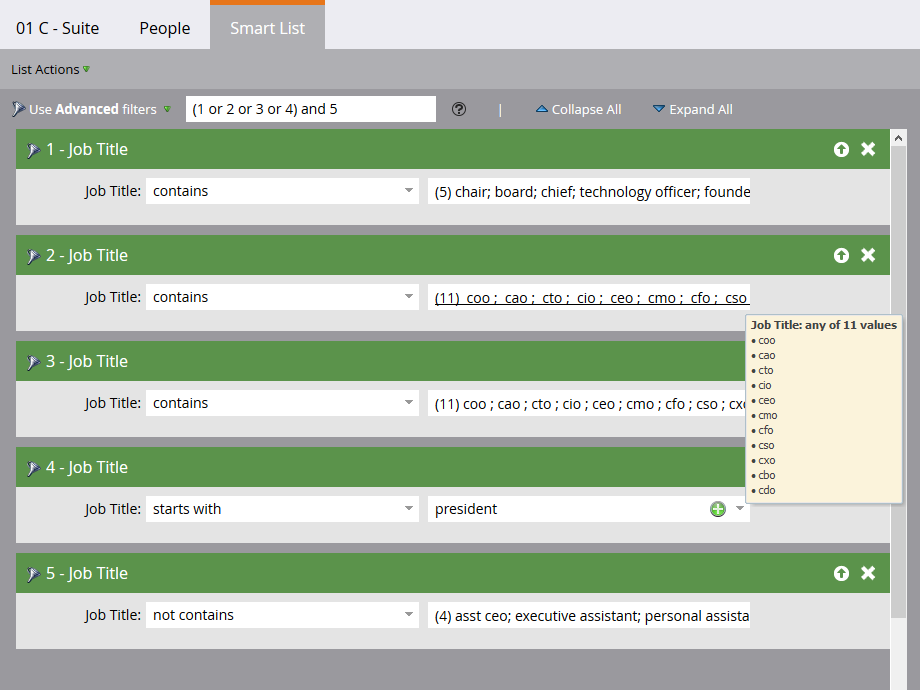
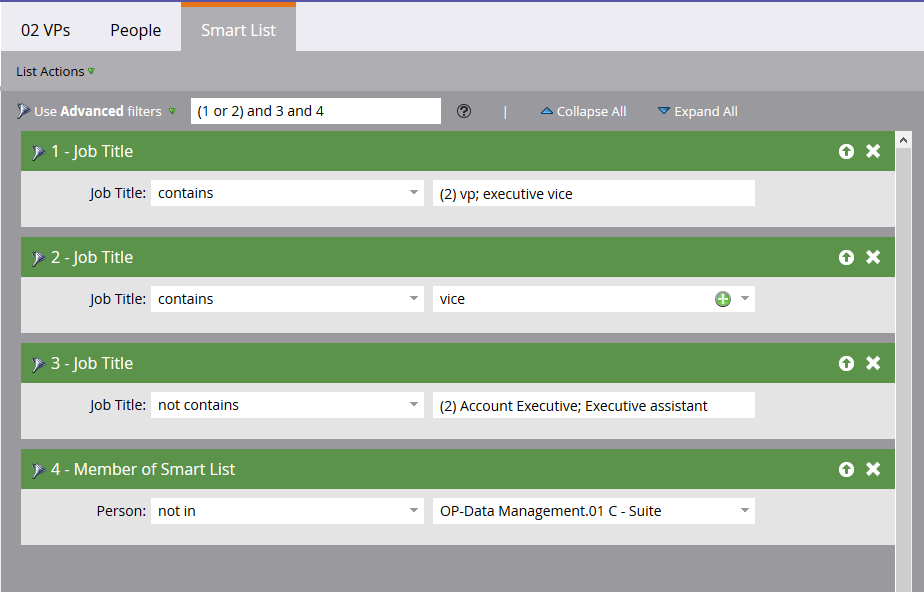
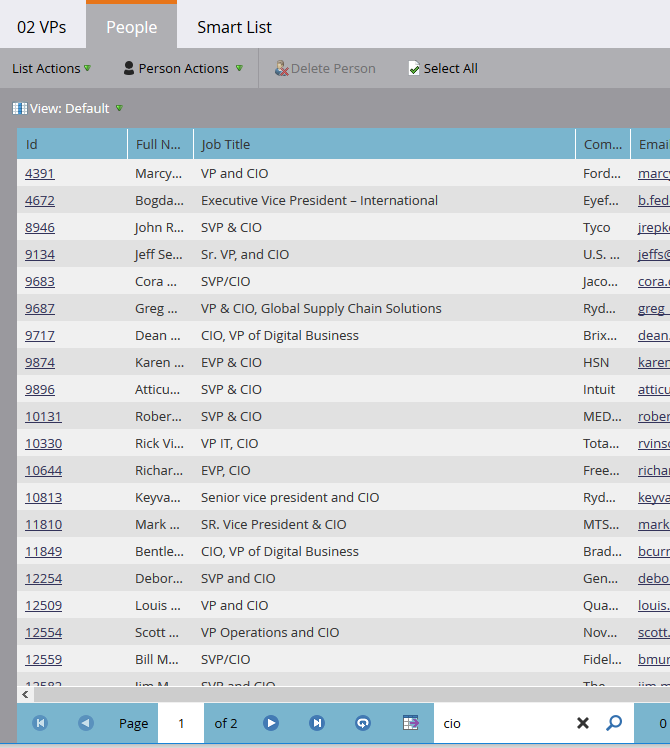
This seemed to have worked for the IT titles, but now I'm trying to run a segmentation for c-suite, vp, directors, managers etc. I used this method again for the c-suite titles like "CIO" and CFO etc. created a c-suite smart list, and created a VP smart list. I excluded the members of 'c-suite smart list' from the 'vp smart list' but when I did a check my VP list included some "CIO" and "CFO" but not in the c-suite list. Not sure what is going on - do you have any insight? I'm not sure what I'm doing wrong....
For c-suite- I created rules to include a space before and after "cio" and another one for just a space after "cio"
- Mark as New
- Bookmark
- Subscribe
- Mute
- Subscribe to RSS Feed
- Permalink
- Report Inappropriate Content
02-08-2018
11:33 AM
02-08-2018
11:33 AM
Re: Spaces in Filters
Looks like your C - Suite list doesn't include a rule for entries that end with a space followed by CxO.
- Mark as New
- Bookmark
- Subscribe
- Mute
- Subscribe to RSS Feed
- Permalink
- Report Inappropriate Content
02-09-2018
06:50 AM
02-09-2018
06:50 AM
Re: Spaces in Filters
Thanks! I think I ended up figuring it out- I guess I needed to have:
- %20CIO%20
- %20CIO (rules of "not contain" - CIOa-z)
- CIO%20
Thanks again!
.png)