
- Marketing Nation
- :
- Products
- :
- Product Discussions
- :
- Re: Salesforce Campaign Type field not visible to ...
Your Achievements


Next /
Sign inSign in to Community to gain points, level up, and earn exciting badges like the new Applaud 5 BadgeLearn more!
View All BadgesSign in to view all badges
SOLVED
Re: Salesforce Campaign Type field not visible to Marketo?
Go to solution
Topic Options
- Subscribe to RSS Feed
- Mark Topic as New
- Mark Topic as Read
- Float this Topic for Current User
- Bookmark
- Subscribe
- Printer Friendly Page


- Mark as New
- Bookmark
- Subscribe
- Mute
- Subscribe to RSS Feed
- Permalink
- Report Inappropriate Content
03-07-2017
01:54 PM
03-07-2017
01:54 PM
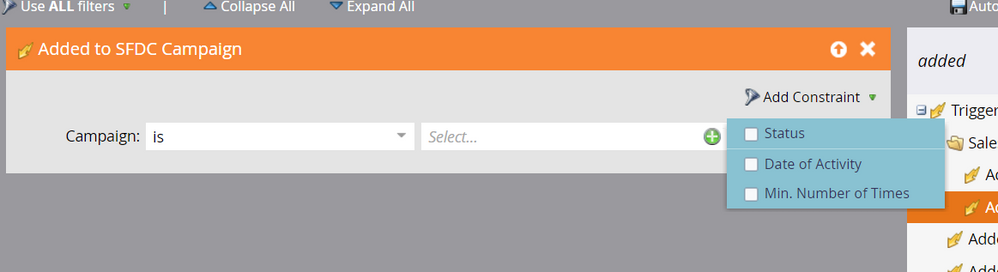
I want to be able to trigger off of people being added to a Salesforce Campaign that has a type of "Event" or "Webinar". For practical reasons, triggering off of the name contains will not work. I made the Campaign Type field visible to my Marketo user but when I look at the trigger options, I can only use campaign name or status, not type. Is this field not available to sync?
Solved! Go to Solution.
Labels:
1 ACCEPTED SOLUTION
Accepted Solutions

Anonymous
Not applicable
- Mark as New
- Bookmark
- Subscribe
- Mute
- Subscribe to RSS Feed
- Permalink
- Report Inappropriate Content
03-07-2017
04:38 PM
03-07-2017
04:38 PM
Not Member of SFDC Campaign filter, use the filter "Campaign Type". Since you synced this field from sfdc you should now have a filter for that field available.
14 REPLIES 14
Anonymous
Not applicable
- Mark as New
- Bookmark
- Subscribe
- Mute
- Subscribe to RSS Feed
- Permalink
- Report Inappropriate Content
03-07-2017
03:34 PM
03-07-2017
03:34 PM
Re: Salesforce Campaign Type field not visible to Marketo?
Add a Campaign Type filter(should be available once the field is synced) to this smart list, not a constraint. so it needs to satisfy the generic trigger AND your specific filter
- Mark as New
- Bookmark
- Subscribe
- Mute
- Subscribe to RSS Feed
- Permalink
- Report Inappropriate Content
03-07-2017
04:31 PM
03-07-2017
04:31 PM
Re: Salesforce Campaign Type field not visible to Marketo?
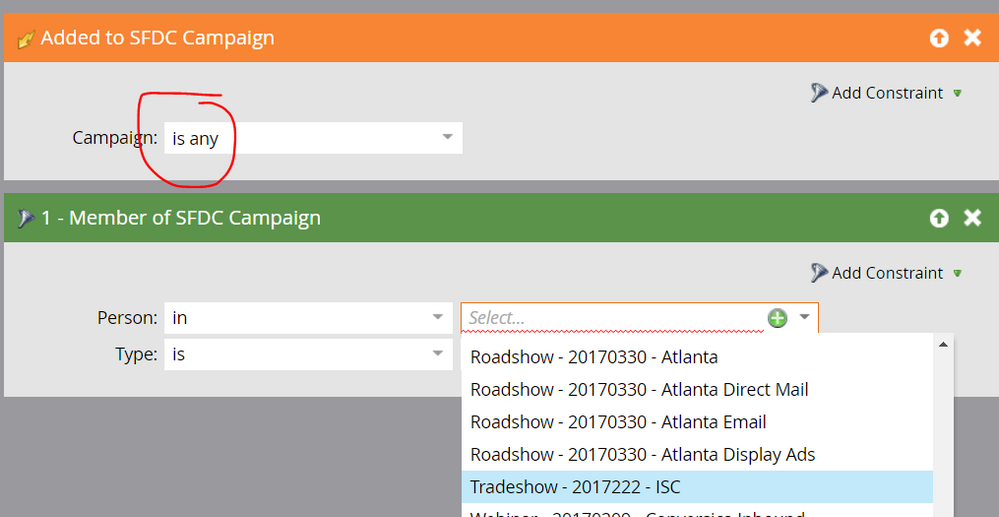
Hey Tony, that works! The only issue I now face is that I can't make the campaign filter generic enough. My use case is anytime a person is added to a Salesforce Campaign with type = Inbound, I want them to go into a certain smart campaign to run through some operational steps.
In the trigger I can choose "Added to SFDC Campaign is any" but in the member of SFDC campaign I have to choose one or more in particular and I can't see a way around it, since person is either "in" or "not in", there's no global choice. Any ideas for how to work around this so I can have a global smart campaign rather than local ones every time I want to run Type = Inbound?
Anonymous
Not applicable
- Mark as New
- Bookmark
- Subscribe
- Mute
- Subscribe to RSS Feed
- Permalink
- Report Inappropriate Content
03-07-2017
04:38 PM
- Mark as New
- Bookmark
- Subscribe
- Mute
- Subscribe to RSS Feed
- Permalink
- Report Inappropriate Content
03-07-2017
05:03 PM
03-07-2017
05:03 PM
Re: Salesforce Campaign Type field not visible to Marketo?
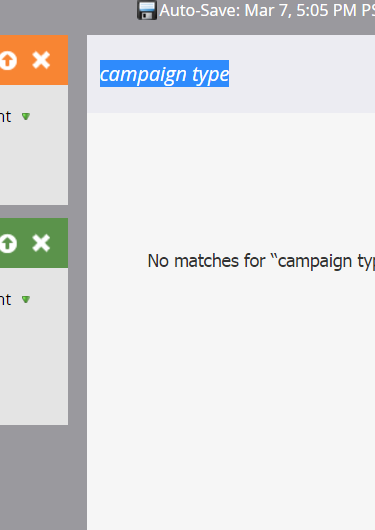
I searched by "Campaign type" and "type" and can't find it.
Anonymous
Not applicable
- Mark as New
- Bookmark
- Subscribe
- Mute
- Subscribe to RSS Feed
- Permalink
- Report Inappropriate Content
03-07-2017
05:18 PM
03-07-2017
05:18 PM
Re: Salesforce Campaign Type field not visible to Marketo?
Is that field showing on your lead/contact records? i.e. did the sync happen? Haven't played with synced campaigns so I might be off assuming the field would act the same as any other field.
- Mark as New
- Bookmark
- Subscribe
- Mute
- Subscribe to RSS Feed
- Permalink
- Report Inappropriate Content
03-07-2017
05:35 PM
03-07-2017
05:35 PM
Re: Salesforce Campaign Type field not visible to Marketo?
This is a field on the campaign object, where there's a one to many relationship with person records in Marketo. The field does not appear on a record because they can be in many campaigns with many different types.
Anonymous
Not applicable
- Mark as New
- Bookmark
- Subscribe
- Mute
- Subscribe to RSS Feed
- Permalink
- Report Inappropriate Content
03-07-2017
05:41 PM
03-07-2017
05:41 PM
Re: Salesforce Campaign Type field not visible to Marketo?
Ahh makes sense now. It's another object so yeah...
Anonymous
Not applicable
- Mark as New
- Bookmark
- Subscribe
- Mute
- Subscribe to RSS Feed
- Permalink
- Report Inappropriate Content
03-07-2017
05:35 PM
03-07-2017
05:35 PM
Re: Salesforce Campaign Type field not visible to Marketo?
You might be able to say person in any and type = inbound?
- Mark as New
- Bookmark
- Subscribe
- Mute
- Subscribe to RSS Feed
- Permalink
- Report Inappropriate Content
03-07-2017
05:37 PM
03-07-2017
05:37 PM
Re: Salesforce Campaign Type field not visible to Marketo?
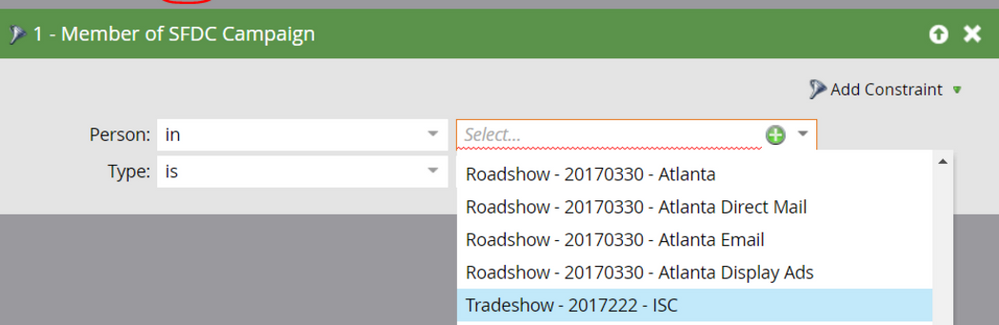
But campaign name is required and there's no option for 'is any'. The filter forces you to choose which campaign they are in if you want to specify the type 
.png)