
- Marketing Nation
- :
- Products
- :
- Product Discussions
- :
- How can I implement Google Tag Manager (GTM) into ...
Your Achievements


Next /
Sign inSign in to Community to gain points, level up, and earn exciting badges like the new Applaud 5 BadgeLearn more!
View All BadgesSign in to view all badges
SOLVED
How can I implement Google Tag Manager (GTM) into Marketo landing pages?
Go to solution
Topic Options
- Subscribe to RSS Feed
- Mark Topic as New
- Mark Topic as Read
- Float this Topic for Current User
- Bookmark
- Subscribe
- Printer Friendly Page

Anonymous
Not applicable
- Mark as New
- Bookmark
- Subscribe
- Mute
- Subscribe to RSS Feed
- Permalink
- Report Inappropriate Content
07-30-2017
07:24 PM
07-30-2017
07:24 PM
Hi there! Just wanting to ask what the best process is for implementing GTM code into my Marketo landing pages? I assume this would be just like any standard implementation (e.g. place the code at the top of the <body> tags within the landing page template (Guided landing pages)).
Solved! Go to Solution.
1 ACCEPTED SOLUTION
Accepted Solutions


- Mark as New
- Bookmark
- Subscribe
- Mute
- Subscribe to RSS Feed
- Permalink
- Report Inappropriate Content
07-30-2017
08:02 PM
07-30-2017
08:02 PM
Yes, if it's a global script, you'd hard-code it in the template.
If there's a need for some kind of conditional include, you can use a mktoBoolean.
11 REPLIES 11
- Mark as New
- Bookmark
- Subscribe
- Mute
- Subscribe to RSS Feed
- Permalink
- Report Inappropriate Content
07-30-2017
08:02 PM


- Mark as New
- Bookmark
- Subscribe
- Mute
- Subscribe to RSS Feed
- Permalink
- Report Inappropriate Content
07-31-2017
08:59 AM
07-31-2017
08:59 AM
Re: How can I implement Google Tag Manager (GTM) into Marketo landing pages?
There are also several tips on the Forums and in previous Summits to use Folder Tokens to place the script across all/some pages and then update it more easily if desired.


- Mark as New
- Bookmark
- Subscribe
- Mute
- Subscribe to RSS Feed
- Permalink
- Report Inappropriate Content
05-20-2020
09:22 AM
05-20-2020
09:22 AM
Re: How can I implement Google Tag Manager (GTM) into Marketo landing pages?
Will this cascade back to the pages that are already set up using that template, or will it just affect new landing pages moving forward?
- Mark as New
- Bookmark
- Subscribe
- Mute
- Subscribe to RSS Feed
- Permalink
- Report Inappropriate Content
05-20-2020
11:34 AM
05-20-2020
11:34 AM
Re: How can I implement Google Tag Manager (GTM) into Marketo landing pages?
As long as you reapprove those LPs, they'll use the stuff in the new template.

- Mark as New
- Bookmark
- Subscribe
- Mute
- Subscribe to RSS Feed
- Permalink
- Report Inappropriate Content
05-04-2022
08:31 AM
05-04-2022
08:31 AM
Re: How can I implement Google Tag Manager (GTM) into Marketo landing pages?
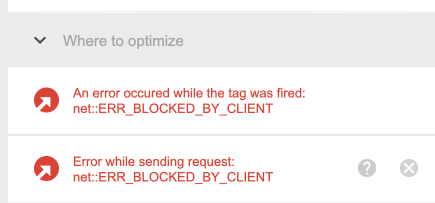
Quick question, I added the GTM script hard-code it in the template, when I am validating the landing page I saw that the connection with Tag Manager has an error:
An error occured while the tag was fired: net::ERR_BLOCKED_BY_CLIENT
It looks like Marketo is rejecting the GTM request, how can I fix it?
Thanks
.
- Mark as New
- Bookmark
- Subscribe
- Mute
- Subscribe to RSS Feed
- Permalink
- Report Inappropriate Content
05-04-2022
03:18 PM
05-04-2022
03:18 PM
Re: How can I implement Google Tag Manager (GTM) into Marketo landing pages?
That’s not Marketo, that’s your ad blocker/privacy plugin blocking the request.
- Mark as New
- Bookmark
- Subscribe
- Mute
- Subscribe to RSS Feed
- Permalink
- Report Inappropriate Content
05-06-2022
08:54 AM
05-06-2022
08:54 AM
Re: How can I implement Google Tag Manager (GTM) into Marketo landing pages?
Thanks, finally is ok

- Mark as New
- Bookmark
- Subscribe
- Mute
- Subscribe to RSS Feed
- Permalink
- Report Inappropriate Content
04-20-2023
09:03 AM
04-20-2023
09:03 AM
Re: How can I implement Google Tag Manager (GTM) into Marketo landing pages?
I am seeing this same issue, but I believe my browser is not blocking it. Did you have to place the tag somewhere special?
- Mark as New
- Bookmark
- Subscribe
- Mute
- Subscribe to RSS Feed
- Permalink
- Report Inappropriate Content
04-20-2023
10:06 AM
04-20-2023
10:06 AM
Re: How can I implement Google Tag Manager (GTM) into Marketo landing pages?
BLOCKED_BY_CLIENT is always because of an ad/privacy blocker. Always.
.png)