
Your Achievements


Next /
Sign inSign in to Community to gain points, level up, and earn exciting badges like the new Applaud 5 BadgeLearn more!
View All BadgesSign in to view all badges
SOLVED
Drop down titles within email template variables
Go to solution
Topic Options
- Subscribe to RSS Feed
- Mark Topic as New
- Mark Topic as Read
- Float this Topic for Current User
- Bookmark
- Subscribe
- Printer Friendly Page


- Mark as New
- Bookmark
- Subscribe
- Mute
- Subscribe to RSS Feed
- Permalink
- Report Inappropriate Content
09-08-2019
03:58 PM
Our email template uses a number of drop down menus - which are super helpful - however, a HEX code doesn't really mean much to a number of users. I haven't really spotted anything that allows me to have a displayed value (e.g. Orange) that, when selected, applies the relevant stored variable when selected (e.g. #F3632D).
So, my question is - is it possible to set up display/store picklist values within the variables section on a module, and if so, how can it be done?
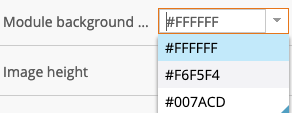
Solved! Go to Solution.
Labels:
2 ACCEPTED SOLUTIONS


- Mark as New
- Bookmark
- Subscribe
- Mute
- Subscribe to RSS Feed
- Permalink
- Report Inappropriate Content
09-10-2019
04:58 AM
Hey Josh,
I think there's an "idea" going for this already somewhere, I remember it coming up a few times after they released EM 2.0 a while back.
As Jay pointed out, you could use "words" (as classes) instead of the hex-value, but that really limits the functionality of your template b/c there are some email clients that won't respect classes written into your <style> element -- so this'll lead to some emails coming thru with default colors (they'll probably inherit the colors from their parent element).
One thing that we setup to kinda of work around this is a "color palette" module that you can drag into the template as a reference while you're building and then remove it once you're ready to ship your email. This helps to visually match the hex-codes with the colors so it's a little easier to get familiar with them. Here's an example of one of those modules from a recent project:



- Mark as New
- Bookmark
- Subscribe
- Mute
- Subscribe to RSS Feed
- Permalink
- Report Inappropriate Content
02-24-2025
08:56 PM
I have a revised solution that works well. It also resolves the issue that some email clients don't like comments in the CSS.
Define your various brand colours like so:
<meta class="mktoString" id="Lt Blue" mktoname="Lt Blue" default="#8CB9E9" mktomodulescope="true" />
    <meta class="mktoString" id="Md Blue" mktoname="Md Blue" default="#0AB2BF" mktomodulescope="true" />
    <meta class="mktoString" id="Dk Blue" mktoname="Dk Blue" default="#001E6D" mktomodulescope="true" />
    <meta class="mktoString" id="Lt Gray" mktoname="Lt Gray" default="#E6E7E8" mktomodulescope="true" />
    <meta class="mktoString" id="Div Gray" mktoname="Div Gray" default="#979797" mktomodulescope="true" />
    <meta class="mktoString" id="Md Gray" mktoname="Md Gray" default="#939598" mktomodulescope="true" />
    <meta class="mktoString" id="Dk Gray" mktoname="Dk Gray" default="#4D4D4F" mktomodulescope="true" />
    <meta class="mktoString" id="Lt Green" mktoname="Lt Green" default="#108A12" mktomodulescope="true" />
    <meta class="mktoString" id="Md Green" mktoname="Md Green" default="#005902" mktomodulescope="true" />
    <meta class="mktoString" id="Dk Green" mktoname="Dk Green" default="#002300" mktomodulescope="true" />
Then have a list that references the Marketo variable names like so:
<meta class="mktoList" mktomodulescope="true" id="mktoMyFontColor" mktoname="Font Color" values=" ${Lt Gray},${Md Gray},${Dk Gray},${Lt Green},${Md Green},${Dk Green}" default="${Lt Green}" />
You'll see I didn't use ALL the brand colours in my list. You make your list contain the colours that are relevant to a given context within the template.
You can see this is using a form of abstraction. It doesn't work outside the Marketo modules (it used to, but Marketo changed something recently), as it requires Marketo to process everything twice (firstly it swaps out ${mktoMyFontColour} for which every colour you chose e.g. ${Md Green}, and then swaps out the ${Md Green} for the actual HTML colour code. So, you can't use it for setting a global background colour for example (but that can still be handled by handling background colour at a module level)
Cheers
Jo
15 REPLIES 15

- Copyright © 2025 Adobe. All rights reserved.
- Privacy
- Community Guidelines
- Terms of use
- Do not sell my personal information
 Adchoices