+1 vote for using Snippets over editable areas or hard-coding the info into the template.
A snippet (class="mktoSnippet") sounds like the right tool for the job here -- it's a "one-to-many" asset that can be seamlessly updated without needing to draft (but with the option to draft if you wanted to) any existing emails or templates. You can include a "mktoSnippet" editable area into a module just like you would a "mktoText" editable area and even place a default snippet in there from the start (for email).
By comparison, using an editable area (class="mktoText") will get you into the situation it sounds like you're already in:
1) It's a "local" solution, so you'll need to update every email individually whenever you make a change to the modules at the template level.
2) If you're using a module, you'll actually need to replace the module in the existing email by dropping in the updated module and removing the old one.
By comparison, using a hard-coded method to place the footer copy (outside of a module) will be moderately better but still not as future-proof as a snippet:
1) You'll need to make edits to the template which you'll need to re-approve which will kick all the assets associated with that template into Draft mode. Those assets then will need to get re-approved to pick up the updated footer text.
In my experience, using a token would be a very close 2nd place to using a snippet. This can be set at a 'global' level in your folder structure and inherited down thru your program folders but the UI is a little less robust for tokens than it is for snippets. You can also see a "Used By" index for snippets at the asset-level (by viewing the snippet details in the file tree) to easily see how many assets are using any particular snippet and as far as I know there's not a parallel for tokens.
Here's a link to the email syntax documentation on snippets for an easy reference:
https://experienceleague.adobe.com/docs/marketo/using/product-docs/email-marketing/general/email-edi...
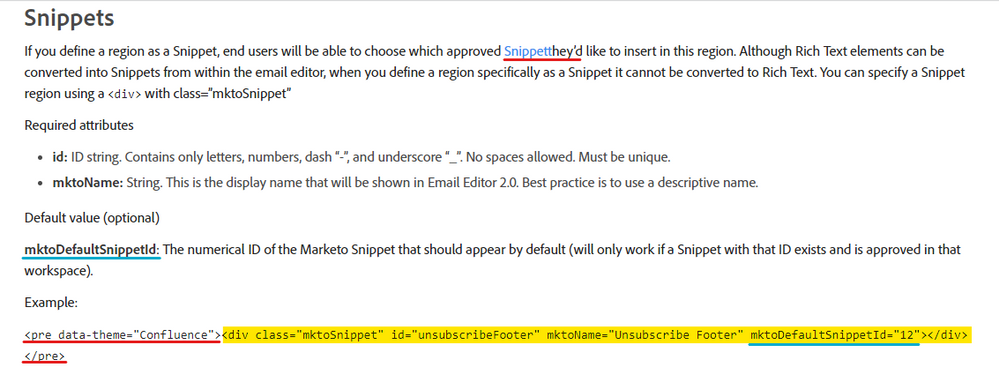
... for reference, I noticed that there's a typo and some code that looks like it's not supposed to be there in the documentation (red underlines). For anyone following along, it looks like the rest of this doc page has the <pre data-theme="Confluence"> and </pre> tags wrapping the correct code (highlighted yellow).
In the image above, the yellow highlighted code is the bit you'd want to use to create an editable snippet area in your template. I've also underlined (in blue) an optional parameter that you can use (or not) to include a snippet by default. For example, if you were to include this in a module, you could pre-populate it with a certain snippet that contained your footer information so that it was there when you dragged it on to the canvas.






 Adchoices