SOLVED

Remove Space in Token Default Value

Go to solution
Anonymous
Not applicable

We are using a "First Name" token in a welcome email to new signups on our website. Our signup form has a First Name field, but it is not required. Therefore, if someone does not put a value in that field when they signup, we will not have a first name value to include in the welcome email. Therefore we need to set a default value. We want to set our default value as [nothing] (so it would show up in an email as "Hello,"). However, when this happens, Marketo is not removing the blank space between "Hello" and the FirstName token value (so it shows up as "Hello ,"). Does anyone know how we can remove this blank space, or will we have to make-do with it?

Thanks in advance!


Andrea

Tags (1)
1 ACCEPTED SOLUTION
Anonymous
Not applicable
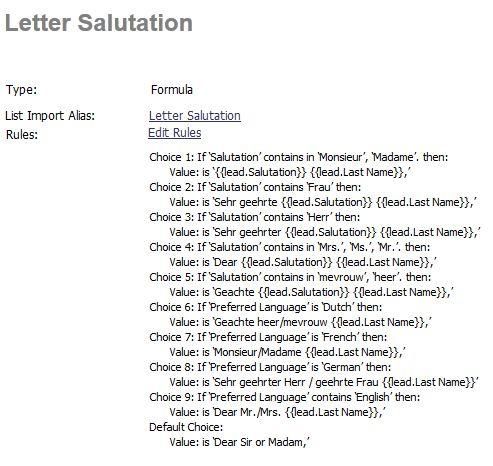
My 2 cents. Rather than making salutations on the fly, I have a specific salutation field setup. My company markets in 6 languages, so we have to take cultural differences into account, so I have to know that in Germany they need salutation + sex + Last name, but in france it's completely different.

Instead I have a single field, which then looks to see what salutation you have. If you have no salutation, then it looks for your preferred language, etc.
0EM50000000Pr2o.jpg

So my answer is, instead of worrying about a space, instead setup the field to give you the results you want each time, regardless of whether or not a first name is in...

PS - Notice that the comma is IN the field. It isn't after the salutation, but contained within it.

View solution in original post

13 REPLIES 13