
Your Achievements


Next /
Sign inSign in to Community to gain points, level up, and earn exciting badges like the new Applaud 5 BadgeLearn more!
View All BadgesSign in to view all badges
SOLVED
Member webinar URL token
Go to solution
Topic Options
- Subscribe to RSS Feed
- Mark Topic as New
- Mark Topic as Read
- Float this Topic for Current User
- Bookmark
- Subscribe
- Printer Friendly Page


- Mark as New
- Bookmark
- Subscribe
- Mute
- Subscribe to RSS Feed
- Permalink
- Report Inappropriate Content
09-15-2021
11:12 PM
I learn a lot from previous discussion but still want to get something more clear.
Please allow me to ask some questions although some might be asked before.
At first, I would like to know if I want to test if my token is populated successfully or not.
I understand the confirmation email must sent directly under the event program.
Thus, I set up followed by Marketo guide like below.
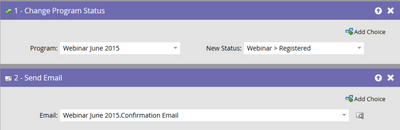
I am wondering to know if must go to the event page to register, then open the confirmation email sent by Marketo ?
OR I can just go to the asset of this confirmation email to send a test email to myself if I had already changed my status to be registered.
Secondly, what if I found the token is not populated, how to find whether there is any error with the registration. I see some people say they can use smart list to filter the people's registration status with error but I could not find it in my filter. Can someone tell how to get this, thank you.

Solved! Go to Solution.
2 ACCEPTED SOLUTIONS


- Mark as New
- Bookmark
- Subscribe
- Mute
- Subscribe to RSS Feed
- Permalink
- Report Inappropriate Content
09-16-2021
05:41 AM
If your Marketo program is connected to a webinar event in your webinar platform, and you set the program status to "Registered", a person is sent to that webinar platform, and the platform sends a value for the token {{member.webinar url}} back.
Once you are registered, put that token in an email, send it to yourself and see if it renders correctly. AFAIK that's the only way to see it.
Registration Errors won't trigger through a non-populated token. It's more the other way around: If your registration fails, the token won't populate. You see registration errors if you filter on them in the program member view:
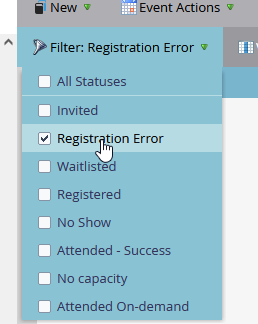
It's certainly not a bad idea to create a trigger campaign that sends an alert should a person ever get this status. Usually that happens if incorrect characters are being sent from Marketo to the webinar platform such as "|" in the company name.


- Mark as New
- Bookmark
- Subscribe
- Mute
- Subscribe to RSS Feed
- Permalink
- Report Inappropriate Content
03-22-2023
10:53 PM
Well, the bespoke LP doesn't force the webinar URL to get synced over from Zoom to Marketo, rather it provides a breather for the sync to process (and displays an apt message to registrants until the sync completes). Instead of sending out emails with {{Member.Webinar URL}} in the email, this method populates it on the LP and the registration confirmation email could link to this LP. Through this, you could ensure that emails don't go out with empty values for the {{Member.Webinar URL}} in case the registrant's unique webinar join link doesn't get synced over to Marketo before the email send. Zoom sends over the {{Member.Webinar URL}} as soon as the program status is updated to Registered in Marketo, it doesn't care whether the status change was triggered by the form fill, you manually changed it, or was changed by flows triggered/ran by non-form fill activity. So IMO you could still use the LP approach documented by Sandy w/o using Marketo forms.
All these data exchanges, i.e., Marketo sending over the Registred program status update and then zoom sending the unique join link back to Marketo could take a while at times (how to deal with these delays is what the LP method tries to address). Lastly, I don't think you could force the sync or predict the sync time for every single case with the 100% precision (if there was a way, we'd not need the LP approach in the first place).
10 REPLIES 10

- Copyright © 2025 Adobe. All rights reserved.
- Privacy
- Community Guidelines
- Terms of use
- Do not sell my personal information
 Adchoices