Hi Yash,
DISCLAIMER: These are NOT the most elegant solutions, but they should work.
1) List Upload
- Create a program in Marketo to upload your exported list to
- Upload your CRM export into a Static List in the program
- Create a Smart Campaign in the program with the Smart List filter "Lead was Created" with the List Name constraint. If a lead was created by your list, it means they were not in Marketo before. Existing leads will be excluded.
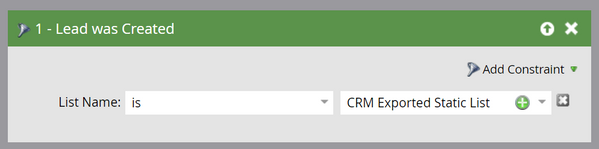
- Add in the flow steps of "Remove from List" and "Delete Person". This removes all of the new leads from your static list and Marketo.
- Now you can use the Static List for your email blast
2) Spreadsheets (Excel)
- If you don't want to import leads to Marketo, you could also identify the existing leads using Excel.
- First, export your leads from Marketo. The main field you need here is email address.
- Next, compare the emails from the CRM export with the emails from the Marketo export - I recommend using index/match or vlookup
- Delete any rows where there is no matching email. These are leads that are unique to your CRM and aren't in Marketo.
- The remaining leads are the ones in both Marketo and your CRM
In an ideal situation, your Marketo and CRM instances would be synced so you wouldn't have to use either of these methods, but I'm assuming you have your reasons for keeping them separate.
Hope that helps!
Dan



 Adchoices