
Your Achievements


Next /
Sign inSign in to Community to gain points, level up, and earn exciting badges like the new Applaud 5 BadgeLearn more!
View All BadgesSign in to view all badges
SOLVED
HTML issue with cross browser css not working
Go to solution
Topic Options
- Subscribe to RSS Feed
- Mark Topic as New
- Mark Topic as Read
- Float this Topic for Current User
- Bookmark
- Subscribe
- Printer Friendly Page


- Mark as New
- Bookmark
- Subscribe
- Mute
- Subscribe to RSS Feed
- Permalink
- Report Inappropriate Content
10-30-2023
09:04 AM
Hi,
I need help with the office and android cross browsing design issue. - Email module issue
https://everest.validity.com/design/share/92a942fef2bfa0/
The design is not coming properly in android and outlook i dont know where i am missing, i created the module and stuck with this cross browser. Its not coming fine with web client and android and office and outlook.
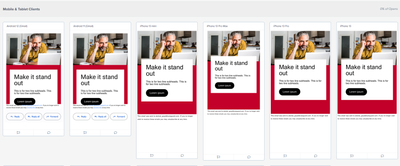

This is the code-
<div style="background-color:${headerSectionContentColor};margin:0px auto;max-width:${emailWidth};">
<table align="center" border="0" cellpadding="0" cellspacing="0" role="presentation" style="background-color:${headerSectionContentColor};width:100%;">
<tbody>
<tr>
<td style="font-size:0px;padding:${headerSectionMobTopPadding} ${headerSectionMobRightPadding} ${headerSectionMobBottomPadding} ${headerSectionMobLeftPadding};vertical-align:top;mso-padding-alt:${headerSectionDeskTopPadding} ${headerSectionDeskRightPadding} ${headerSectionDeskBottomPadding} ${headerSectionDeskLeftPadding};" class="block-grid padding-${headerSectionDeskTopPadding}-${headerSectionDeskRightPadding}-${headerSectionDeskBottomPadding}-${headerSectionDeskLeftPadding}">
<!--[if mso | IE]>
<table role="presentation" border="0" cellpadding="0" cellspacing="0">
<tr>
<td style="vertical-align:top;"><![endif]-->
<div class="mj-column-per-100 mj-outlook-group-fix mj-column-header-mobile-fix" cellpadding="10" style="font-size:0px;text-align:left;direction:ltr;display:inline-block;vertical-align:top;width:100%;height: 34vh;">
<table class="mj-table-header-mobile-fix" border="0" cellpadding="0" cellspacing="0" role="presentation" style="border-radius:0px;vertical-align:top;padding: 30px;text-align: center; background-color: #ffffff; top: -90px;position: relative;" width="100%">
<tbody>
<tr>
<td class="text-container" style="font-size:0px;padding:${headerSectionTitleTopSpacing} ${headerSectionTitleRightSpacing} ${headerSectionTitleBottomSpacing} ${headerSectionTitleLeftSpacing};mso-padding-alt:${headerSectionTitleTopSpacing} ${headerSectionTitleRightSpacing} ${headerSectionTitleBottomSpacing} ${headerSectionTitleLeftSpacing} ;word-break:break-word;text-align:${headerSectionTitleAlign};">
<div class="mktoText ${headerSectionTitleFontFamily}" id="title" mktoname="Title" style="font-size:${headerSectionTitleFontSize};letter-spacing:${headerSectionTitleLetterSpacing};line-height:${headerSectionTitleLineHeight};mso-line-height-rule:exactly;text-align:${headerSectionTitleAlign};color:${headerSectionTitleColor};font-style:${headerSectionTitleFontStyle}">
<p>Make it stand out</p>
</div> </td>
</tr>
<tr>
<td class="text-container" style="font-size:0px;padding:${headerSectionSubTitleTopSpacing} ${headerSectionSubTitleRightSpacing} ${headerSectionSubTitleBottomSpacing} ${headerSectionSubTitleLeftSpacing};word-break:break-word;mso-padding-alt:${headerSectionSubTitleTopSpacing} ${headerSectionSubTitleRightSpacing} ${headerSectionSubTitleBottomSpacing} ${headerSectionSubTitleLeftSpacing};text-align:${headerSectionSubTitleAlign};">
<div class="mktoText ${headerSectionSubTitleFontFamily}" id="subTitle" mktoname="Sub Title" style="font-size:${headerSectionSubTitleFontSize};letter-spacing:${headerSectionSubTitleLetterSpacing};line-height:${headerSectionSubTitleLineHeight};mso-line-height-rule:exactly;text-align:${headerSectionSubTitleAlign};color:${headerSectionSubTitleColor};font-style:${headerSectionSubTitleFontStyle}">
<p>This is for two line subheads. This is for two line subheads.</p>
</div> </td>
</tr>
<tr style="display:${hideCTA}">
<td valign="middle" class="button-container" style="font-size:0px;padding:${headerSectionCTATopSpacing} ${headerSectionCTARightSpacing} ${headerSectionCTABottomSpacing} ${headerSectionCTALeftSpacing};mso-padding-alt:${headerSectionCTATopSpacing} ${headerSectionCTARightSpacing} ${headerSectionCTABottomSpacing} ${headerSectionCTALeftSpacing};word-break:break-word;text-align:${headerSectionCTAAlign};">
<div>
<!--[if mso]>
<table width="100%" align="center" border="0" cellpadding="0" cellspacing="0" style="border-spacing:0;border-collapse:collapse;mso-table-lspace:0pt;mso-table-rspace:0pt;">
<tr>
<td align="left" class="mso-button-dark-mode"><a:roundrect xmlns:a="urn:schemas-microsoft-com:vml" xmlns:w="urn:schemas-microsoft-com:office:word" fillcolor="${headerSectionCTABgColor}" arcsize="52%" style="v-text-anchor:middle;width:105pt;height:36pt;" stroke="f" ><w:anchorlock/><a:textbox inset="0,0,0,0"><center style="color:${headerSectionCTAColor}; font-family:${headerSectionCTAFontFamily}; font-size:${headerSectionSubTitleFontSize}"><![endif]-->
<div class="mktoText ${headerSectionCTAFontFamily} ${ctaUnderline}" id="headerCTA" mktoname="Header CTA" style="display:inline-block;background:${headerSectionCTABgColor};color:${headerSectionCTAColor};font-size:${headerSectionSubTitleFontSize};font-weight:${headerSectionCTAFontWeight};letter-spacing:${headerSectionCTALetterSpacing};line-height:${headerSectionCTALineHeight};mso-line-height-rule:exactly;margin:0;text-align:${headerSectionCTAAlign};text-decoration:${ctaUnderline};text-transform:none;padding:16px 24px 16px 24px;mso-padding-alt:0px;border-radius:25px;mso-border-alt:none;box-sizing:border-box;width:auto;white-space:nowrap">
<p> <a href="www.linkedin.com/showcase/vanguard-financial-advisor-services/?CID=FAS:MC:123456." title="Header CTA" style="color:${headerSectionCTAColor}">Lorem ipsum </a> </p>
</div>
<!--[if mso]></center></a:textbox></a:roundrect>
</td>
</tr>
</table><![endif]-->
</div> </td>
</tr>
</tbody>
</table>
</div>
<!--[if mso | IE]>
</td>
</tr>
</table><![endif]--> </td>
</tr>
</tbody>
</table>
</div>
Solved! Go to Solution.
Labels:
2 ACCEPTED SOLUTIONS


- Mark as New
- Bookmark
- Subscribe
- Mute
- Subscribe to RSS Feed
- Permalink
- Report Inappropriate Content
11-02-2023
02:42 AM
Hi @akshat_goyal,
Here you don't need to use a background image, please use a simple image - https://prnt.sc/9BZJ0nYMjwrs
After that, it will work on Android devices.
Thanks!
- Mark as New
- Bookmark
- Subscribe
- Mute
- Subscribe to RSS Feed
- Permalink
- Report Inappropriate Content
11-02-2023
04:21 AM
10 REPLIES 10

- Copyright © 2025 Adobe. All rights reserved.
- Privacy
- Community Guidelines
- Terms of use
- Do not sell my personal information
 Adchoices