
Your Achievements


Next /
Sign inSign in to Community to gain points, level up, and earn exciting badges like the new Applaud 5 BadgeLearn more!
View All BadgesSign in to view all badges
Changing checkbox values color in forms 2.0
Topic Options
- Subscribe to RSS Feed
- Mark Topic as New
- Mark Topic as Read
- Float this Topic for Current User
- Bookmark
- Subscribe
- Printer Friendly Page

Anonymous
Not applicable
02-18-2014
02:09 PM
- Mark as New
- Bookmark
- Subscribe
- Mute
- Subscribe to RSS Feed
- Permalink
- Report Inappropriate Content
02-18-2014
02:09 PM
Hi All,
I am trying to change the check box value color (not the technical label), I do not know what the appropriate css is to do this. Currently it is grey. Please see below.

Does anyone else know.
Cheers,
Bec
I am trying to change the check box value color (not the technical label), I do not know what the appropriate css is to do this. Currently it is grey. Please see below.
Does anyone else know.
Cheers,
Bec
Labels:
- Labels:
-
Lead Management
14 REPLIES 14
Anonymous
Not applicable
03-05-2015
12:31 PM
- Mark as New
- Bookmark
- Subscribe
- Mute
- Subscribe to RSS Feed
- Permalink
- Report Inappropriate Content
03-05-2015
12:31 PM
For those curious on changing the color of the select field text, "Select Industry..." in this example, I was able to change the color using this custom CSS:
The only slight issue, is that it changes the color for all the values... the "Select Industry..." default text as well as all the values you can select from the list.
If anyone knows of a way to change only the color of "Select Industry..." and not the values in the list, I would love to know how! I'd like to change the default 'select' text to grey, but leave all the values as black.
.mktoForm select.mktoField {color: #999999 !important;}
The only slight issue, is that it changes the color for all the values... the "Select Industry..." default text as well as all the values you can select from the list.
If anyone knows of a way to change only the color of "Select Industry..." and not the values in the list, I would love to know how! I'd like to change the default 'select' text to grey, but leave all the values as black.
Anonymous
Not applicable
02-27-2014
01:44 AM
- Mark as New
- Bookmark
- Subscribe
- Mute
- Subscribe to RSS Feed
- Permalink
- Report Inappropriate Content
02-27-2014
01:44 AM
Perfect! Thanks so much Bec.
Anonymous
Not applicable
02-26-2014
10:03 PM
- Mark as New
- Bookmark
- Subscribe
- Mute
- Subscribe to RSS Feed
- Permalink
- Report Inappropriate Content
02-26-2014
10:03 PM
Hey Lauren,
Here is the css I used to change the grey text I circled above to white:
Here is the css I used to change the grey text I circled above to white:
.mktoForm {
color: #ffffff !important;
}
Let me know if that helps?
Cheers,
Bec
Let me know if that helps?
Cheers,
Bec
Anonymous
Not applicable
02-26-2014
02:59 AM
- Mark as New
- Bookmark
- Subscribe
- Mute
- Subscribe to RSS Feed
- Permalink
- Report Inappropriate Content
02-26-2014
02:59 AM
Hi, I am trying to do a similar thing here.....I have changed the label colour but for some reason the radio button text is still appearing in black? I tried the html code above and it doesn't seem to be making a difference.
Anonymous
Not applicable
02-18-2014
07:03 PM
- Mark as New
- Bookmark
- Subscribe
- Mute
- Subscribe to RSS Feed
- Permalink
- Report Inappropriate Content
02-18-2014
07:03 PM
Oh my don't worry, I was missing a '}'.
Thank you soooo much for your help! I owe you a drink if you are coming to the Conference!
Bec
Thank you soooo much for your help! I owe you a drink if you are coming to the Conference!
Bec
Anonymous
Not applicable
02-18-2014
07:00 PM
- Mark as New
- Bookmark
- Subscribe
- Mute
- Subscribe to RSS Feed
- Permalink
- Report Inappropriate Content
02-18-2014
07:00 PM
Hey Jeff,
It's still not changing the text circled below... Any ideas?
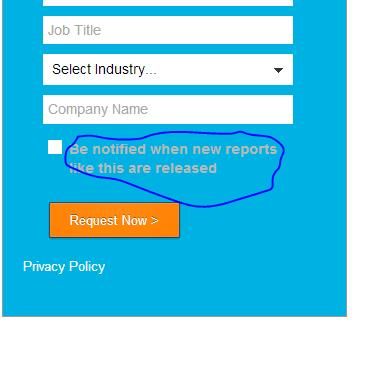
It's still not changing the text circled below... Any ideas?
Anonymous
Not applicable
02-18-2014
04:11 PM
- Mark as New
- Bookmark
- Subscribe
- Mute
- Subscribe to RSS Feed
- Permalink
- Report Inappropriate Content
02-18-2014
04:11 PM
You can change the input color:
.mktoForm input, .mktoForm select, .mktoForm {
color: #FF4545 !important;
}

Not so sure about the checkmark color.
Not so sure about the checkmark color.
Anonymous
Not applicable
02-18-2014
04:02 PM
- Mark as New
- Bookmark
- Subscribe
- Mute
- Subscribe to RSS Feed
- Permalink
- Report Inappropriate Content
02-18-2014
04:02 PM
Oh, you want to change the input text color? So the checkmark is not black? Is this correct?
Anonymous
Not applicable
02-18-2014
03:48 PM
- Mark as New
- Bookmark
- Subscribe
- Mute
- Subscribe to RSS Feed
- Permalink
- Report Inappropriate Content
02-18-2014
03:48 PM
Hey Jeff,
The page isn't live yet, I just want to double check we are looking at the same thing.
Below is the edit screen, I have removed the label entirely to just have the value show.
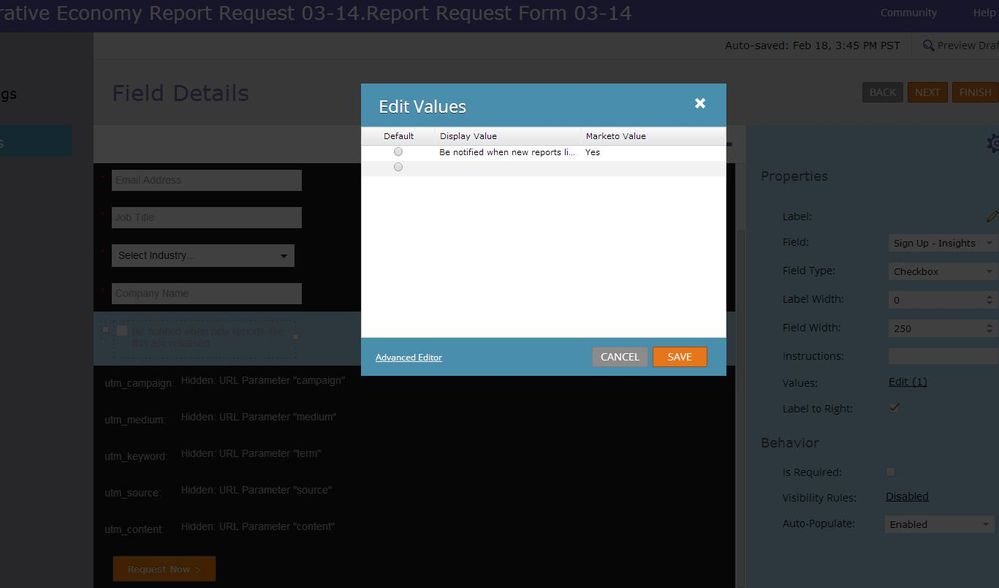
I think the other code changes the label only, not the value color.
I am not sure, it doesn't seem to be making a difference.
Cheers,
Bec
The page isn't live yet, I just want to double check we are looking at the same thing.
Below is the edit screen, I have removed the label entirely to just have the value show.
I think the other code changes the label only, not the value color.
I am not sure, it doesn't seem to be making a difference.
Cheers,
Bec
Anonymous
Not applicable
02-18-2014
03:44 PM
- Mark as New
- Bookmark
- Subscribe
- Mute
- Subscribe to RSS Feed
- Permalink
- Report Inappropriate Content
02-18-2014
03:44 PM
Really? This worked for me. Can you send me the link to the landing page you are working on? -Jeff
Anonymous
Not applicable
02-18-2014
03:40 PM
- Mark as New
- Bookmark
- Subscribe
- Mute
- Subscribe to RSS Feed
- Permalink
- Report Inappropriate Content
02-18-2014
03:40 PM
Hey Jeffrey, it doesn't seem to change the value color?
Anonymous
Not applicable
02-18-2014
02:41 PM
- Mark as New
- Bookmark
- Subscribe
- Mute
- Subscribe to RSS Feed
- Permalink
- Report Inappropriate Content
02-18-2014
02:41 PM
You can change all the label colors:
.mktoForm label, .mktoForm p {
- color: #fff !important;
}
Anonymous
Not applicable
02-18-2014
02:36 PM
- Mark as New
- Bookmark
- Subscribe
- Mute
- Subscribe to RSS Feed
- Permalink
- Report Inappropriate Content
02-18-2014
02:36 PM
Hey Jeffrey,
Thanks, do you know how I could change the font color from grey to white in the example above?
Cheers,Bec
Thanks, do you know how I could change the font color from grey to white in the example above?
Cheers,Bec
Anonymous
Not applicable
02-18-2014
02:20 PM
- Mark as New
- Bookmark
- Subscribe
- Mute
- Subscribe to RSS Feed
- Permalink
- Report Inappropriate Content
02-18-2014
02:20 PM
.mktoForm input[type=checkbox] + label:before, .mktoForm input[type=radio] + label:before {
background-color: #E23B3B !important;
}
Using above I changed the checkbox bg color to red:
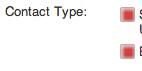
Using above I changed the checkbox bg color to red:
- Copyright © 2025 Adobe. All rights reserved.
- Privacy
- Community Guidelines
- Terms of use
- Do not sell my personal information
 Adchoices