
- Marketing Nation
- :
- Products
- :
- Product Discussions
- :
- Re: How to add H1 and H2 tags and use alt text for...
Your Achievements


Next /
Sign inSign in to Community to gain points, level up, and earn exciting badges like the new Applaud 5 BadgeLearn more!
View All BadgesSign in to view all badges
SOLVED
Re: How to add H1 and H2 tags and use alt text for the image
Go to solution
Topic Options
- Subscribe to RSS Feed
- Mark Topic as New
- Mark Topic as Read
- Float this Topic for Current User
- Bookmark
- Subscribe
- Printer Friendly Page


- Mark as New
- Bookmark
- Subscribe
- Mute
- Subscribe to RSS Feed
- Permalink
- Report Inappropriate Content
06-12-2013
04:58 AM
06-12-2013
04:58 AM
Hi,
Our SEO company has suggested that I add on my landing pages H1 and H2 tags and use alt text for the pictures. Do you know how to do that?
Cécile @ Talend
Our SEO company has suggested that I add on my landing pages H1 and H2 tags and use alt text for the pictures. Do you know how to do that?
Cécile @ Talend
Solved! Go to Solution.
Labels:
1 ACCEPTED SOLUTION
Accepted Solutions

Anonymous
Not applicable
- Mark as New
- Bookmark
- Subscribe
- Mute
- Subscribe to RSS Feed
- Permalink
- Report Inappropriate Content
06-12-2013
06:31 AM
06-12-2013
06:31 AM
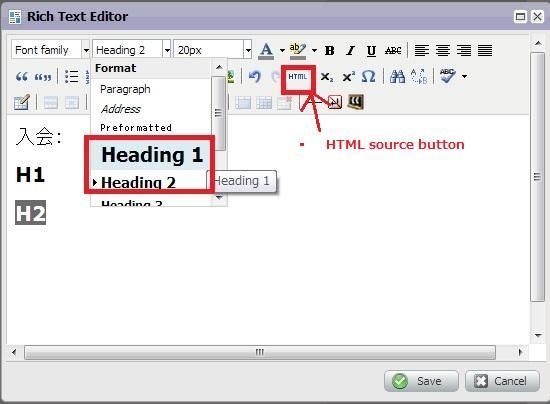
Just select "Heading1" and "Heading2" from the paragraph drop down list to use H1 and H2 tags. You can select the "HTML" button to see the generated HTML source.
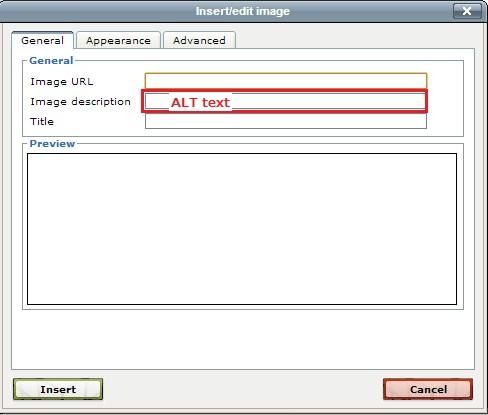
To add the Alt, just enter the text in the "Image Description" field which pops up when you click the "Image" icon.
To add the Alt, just enter the text in the "Image Description" field which pops up when you click the "Image" icon.
5 REPLIES 5
Anonymous
Not applicable
- Mark as New
- Bookmark
- Subscribe
- Mute
- Subscribe to RSS Feed
- Permalink
- Report Inappropriate Content
06-12-2013
05:23 AM
06-12-2013
05:23 AM
Re: How to add H1 and H2 tags and use alt text for the image
H1 and H2 apply to text. You can add them editing a Rich Text box and then clicking the HTML button, between Redo and Subscript. It opens the HTML Source Editor.
Locate the text you need to change font style and add < h 1 > text < / h 2 >
There are no spaces. I added here to avoid the systems interpreting as valid tags.
A simple example consisting of word "test" would be geneated as
< p >< / p >test< p >< / p >< p > < / p >< p >< / p >
A simple example consisting of word "test" would be geneated as
< p >< / p >test< p >< / p >< p > < / p >< p >< / p >
and the change would be
< p >< / p >< h 1 >test< p >< / p >< p > < / p >< / h 1>< p >< / p >
h1 is the largest text, h2 is smaller than h1.
Reference
http://www.w3schools.com/tags/tag_hn.asp
< p >< / p >< h 1 >test< p >< / p >< p > < / p >< / h 1>< p >< / p >
h1 is the largest text, h2 is smaller than h1.
Reference
http://www.w3schools.com/tags/tag_hn.asp
Anonymous
Not applicable
- Mark as New
- Bookmark
- Subscribe
- Mute
- Subscribe to RSS Feed
- Permalink
- Report Inappropriate Content
06-12-2013
06:31 AM
06-12-2013
06:31 AM
Just select "Heading1" and "Heading2" from the paragraph drop down list to use H1 and H2 tags. You can select the "HTML" button to see the generated HTML source.
To add the Alt, just enter the text in the "Image Description" field which pops up when you click the "Image" icon.
To add the Alt, just enter the text in the "Image Description" field which pops up when you click the "Image" icon.


- Mark as New
- Bookmark
- Subscribe
- Mute
- Subscribe to RSS Feed
- Permalink
- Report Inappropriate Content
09-09-2013
05:29 PM
09-09-2013
05:29 PM
Re: How to add H1 and H2 tags and use alt text for the image
how do i add the alt text when image in an email? don't get the above edit box
- Mark as New
- Bookmark
- Subscribe
- Mute
- Subscribe to RSS Feed
- Permalink
- Report Inappropriate Content
09-09-2013
05:34 PM
09-09-2013
05:34 PM
Re: How to add H1 and H2 tags and use alt text for the image
i dont see the above box when i click on images on my landing pages?? how do i get to it exactly?
Anonymous
Not applicable
- Mark as New
- Bookmark
- Subscribe
- Mute
- Subscribe to RSS Feed
- Permalink
- Report Inappropriate Content
01-17-2014
04:19 PM
01-17-2014
04:19 PM
Re: How to add H1 and H2 tags and use alt text for the image
@Trish, I'm not sure if you're looking for an answer to this, but here's what you need to do:
(1) drag over "Rich Text" to the landing page editor's canvas
(2) copy & paste in an image
(3) select the image in the rich text editor and then click on the button below to see the box where you can set the image's ALT tag

(1) drag over "Rich Text" to the landing page editor's canvas
(2) copy & paste in an image
(3) select the image in the rich text editor and then click on the button below to see the box where you can set the image's ALT tag
.png)